



Best for complex architectural changes, deep refactors, and high-reasoning planning phases.

ProPR makes the agent a per-task choice. Use one model for broad context, another for deep implementation, and a faster model for review. Bring existing provider subscriptions or API keys; planning, implementation, and review still share one process.
Best for complex architectural changes, deep refactors, and high-reasoning planning phases.

Fast, deeply integrated implementation using OpenAI's flagship coding models.

Google's multi-model CLI agent: Gemini, Claude, and GPT-OSS backing models through one container and credential mount.

Highly cost-efficient open-weight models for standard reviews and implementation passes.

Provider-agnostic open-source agent with a lineup of free models — zero-cost passes and comparison baselines.
A task can start with one agent for broad context, move to Claude for a tricky implementation, and use Codex for a follow-up fix. No matter which agent runs, ProPR leaves one coherent audit trail: what was planned, which agent ran, exactly what it cost, and what landed in GitHub.
ProPR bundles its Operator Agent Skill for Codex, Claude, Antigravity, and OpenCode. The installed skill teaches the assistant to delegate through GitHub and ProPR after a human creates or triages the issue. That human controls repository, provider, system, membership, and access permissions; the assistant never grants or broadens them. The CLI is an optional guided path that safely installs, checks, updates, or removes the skill.
Pick the agent and model that fits each phase: planning, context analysis, implementation, review, follow-ups, and repository suggestions.
Send one request to several agent and model combinations. Compare their pull requests side by side, then merge the strongest result.
Usage logs show which model handled the task, how long it took, and what it cost. Agent Tank adds subscription and rate-limit visibility across supported agents.
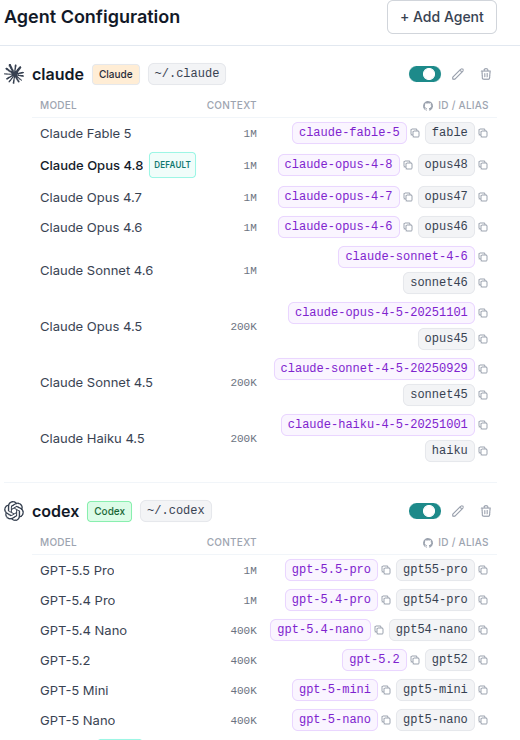
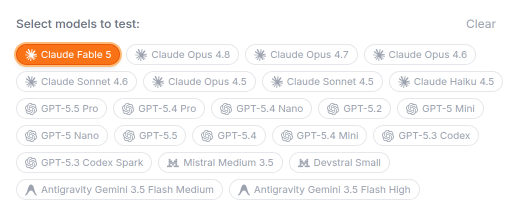
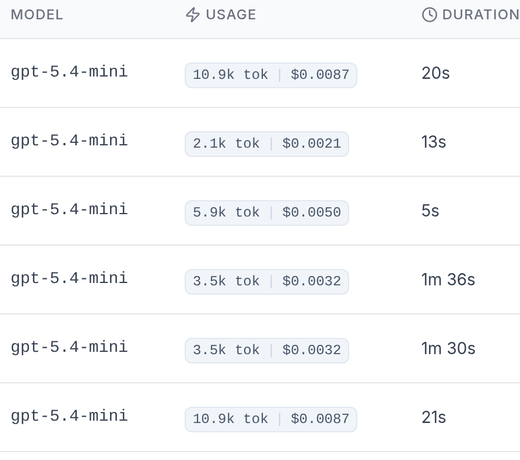
Issue #153 asked for abuse-prevention controls. ProPR ran it through Codex with GPT-5.5 and Claude Code with Claude Fable 5. Each run returned its own branch, implementation summary, and pull request for direct comparison.


The MCP integration lets a chat client request work from your ProPR instance. Your configured coding agents still execute on your infrastructure. Direct access and Connect use the same core tools, resources, and prompts.
ProPR exchanges text and structured data. Speech input and output belong to the host, whose voice mode may not expose MCP tools. Browser authentication handles secrets and consent.
Compare the shared PR workflow with hosted agent UIs, AI IDEs, and direct CLI tools.
Compare ProPR against the alternatives →